
Reduce Skin Shininess - Photoshop Tutorial

This is a nifty little trick to reduce skin shininess - perfect if you are finding hotspots on your images, espeically if they are appearing on peoples faces. And the best thing about it? It is ridiculously quick and simple!


Process:
1) Open image and process as required
2) Create a new layer on top of the image. Rename this layer “Matt”.
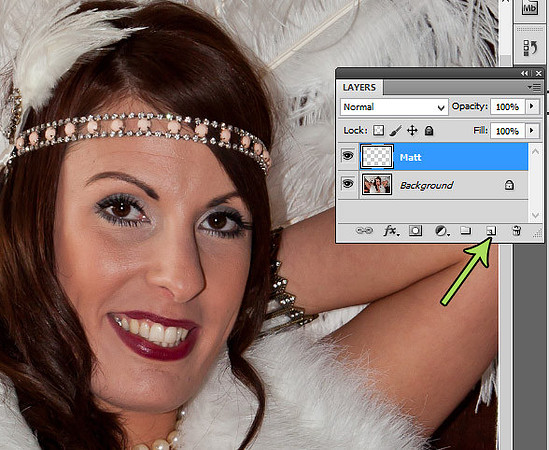 3) Use the eyedropper tool to select a patch of skin that is matt and not shiny. Ensure the area chosen is close to the shiny area.
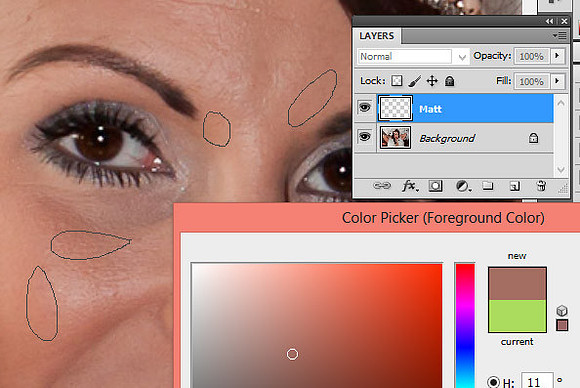 4) With the “Matt” layer selected, paint over the shiny areas using a brush with normal mode, 15% opacity and 70% flow. For extra shiny areas, repaint two or three times. You will probably find that shiny spots will appear on the forehead, nose and chin.
5) Finish by selecting the background layer, right-clicking and choosing “Flatten image”.
 So there you go, another simple and subtle photoshop technique. It can also be used to reduce the appearance of dark circles under the eyes - just be careful not to overdo it! You can find the PDF of the process here.
Comments
|
January
(1)
February (1)
(4)
March (4)
(6)
April (6)
(5)
May (5)
(4)
June (4)
(2)
July (2)
(7)
August (7)
(3)
September (3)
(6)
October (6)
(5)
November (5)
(3)
December (3)
|
(3)
January (3)
(2)
February (2)
(4)
March (4)
(3)
April (3)
(6)
May (6)
(3)
June (3)
(6)
July (6)
August
September
(1)
October (1)
November
December
|
January
(1)
February (1)
March
(4)
April (4)
May
June
July
August
September
(1)
October (1)
(2)
November (2)
December
|
(7)
January (7)
(6)
February (6)
(1)
March (1)
(2)
April (2)
(2)
May (2)
June
(1)
July (1)
(1)
August (1)
(1)
September (1)
(1)
October (1)
(1)
November (1)
(2)
December (2)
|
January
(1)
February (1)
(2)
March (2)
(2)
April (2)
(1)
May (1)
(2)
June (2)
(4)
July (4)
(3)
August (3)
(2)
September (2)
(9)
October (9)
(4)
November (4)
(1)
December (1)
|
(3)
January (3)
February
(2)
March (2)
(2)
April (2)
(4)
May (4)
(8)
June (8)
(2)
July (2)
(4)
August (4)
(1)
September (1)
(3)
October (3)
(4)
November (4)
(4)
December (4)
|
(1)
January (1)
(2)
February (2)
(1)
March (1)
(1)
April (1)
(3)
May (3)
(2)
June (2)
(3)
July (3)
(1)
August (1)
(1)
September (1)
(3)
October (3)
(2)
November (2)
(3)
December (3)
|
(2)
January (2)
(2)
February (2)
(2)
March (2)
(2)
April (2)
(1)
May (1)
(3)
June (3)
(1)
July (1)
(1)
August (1)
(1)
September (1)
(4)
October (4)
(1)
November (1)
(2)
December (2)
|
(2)
January (2)
(1)
February (1)
(2)
March (2)
(2)
April (2)
May
June
July
August
September
October
November
December
|
January
February
March
April
May
June
July
August
September
October
November
December
|
January
February
March
April
May
June
July
August
September
October
November
December
|
January
February
March
April
May
June
July
August
September
October
November
December
|
January
February
March
April
May
June
July
August
September
October
November
December
|
January
February
March
April
May
June
July
August
September
October
November
December
|
Keep in touch!
If you would like to hear about all of the latest news and upcoming events then pop your email address into the box below to subscribe to my newsletter:


 Chippenham Business Awards finalist 2020Chippenham Business Awards finalist 2020

 Featured by Bride and TonicFeatured by Bride and Tonic